Recently you have changed the login password of your Windows PC, but forget to memorise it. Now you are unable to login to your administrator account. Without the password you can not unlock your Windows PC and will suffer problems. In this situation you may try to re-install the Windows OS, because doing this will wipe the entire C:/ drive which also contains the password, or you may try to find some password recovery tool for Microsoft Windows. But re-installing and re-configuring the Windows software is time consuming and you do not want to loose all your installed programs and settings, secondly unauthorized Windows password recovery tools doesn’t have 100% success rate.

There is an useful software known as the Tenorshare Windows Password Recovery Tool that works on Windows XP/Vista/7/8/10 which can be used to reset lost Windows admin passwords. It is quiet easy to use and works with all desktops and notebooks.
Download Tenorshare Windows Password Recovery
This is the review of Tenorshare Windows Password Recovery Standard which is an excellent tool to remove your lost Windows computer password. It is best suited for home and office use, however it has some limitations like you can not create bottable USB, no support for Windows Domain users etc.
But if you want more functions than you can choose from ‘Professional’, ‘Enterprise’ and ‘Ultimate’ versions of the same software which provides different functions, the Ultimate version is the top most product with all functions.
Before you can buy it you can try it. After using it makes you feel that it works for you then you can buy it, the product comes with a 30-day money back guarantee. Go here to buy.
If you have any doubts then reply via comments.
Tenorshare Windows Password Recovery: Password Recovery Tool For Windows XP/Vista/7/8/10

There is an useful software known as the Tenorshare Windows Password Recovery Tool that works on Windows XP/Vista/7/8/10 which can be used to reset lost Windows admin passwords. It is quiet easy to use and works with all desktops and notebooks.
Download Tenorshare Windows Password Recovery
How To Use The Tenorshare Windows Password Recovery Tool
- Download and install the software on another computer which is not locked.
- You should have a blank CD/DVD or a USB flash drive for creating a bootable recovery image.
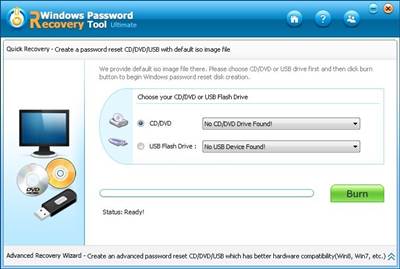
- Open the program and either choose CD/DVD or USB Flash Drive to create a bootable media. After selecting the media click ‘Burn’.
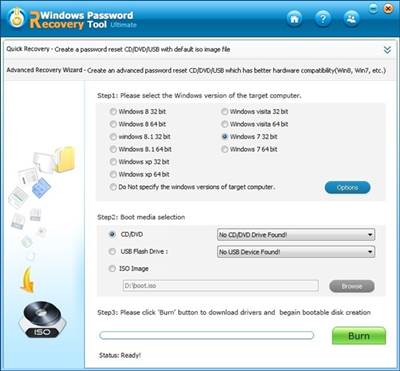
- You can also select the Advance Recovery Wizard in which you can choose the right Windows OS. After making your selection click ‘Burn’.
- After creating the bootable media insert/plug in to the older locked computer and change bios settings to boot from the CD/DVD or USB that you have created.
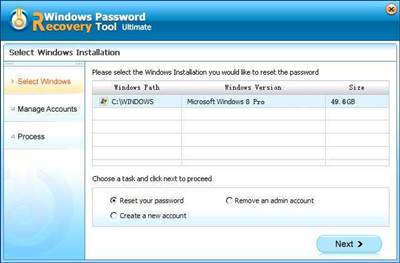
- After booting you will see a password manager screen like this below.
- Choose the Windows OS and select ‘Reset your password’, then click ‘Next’.
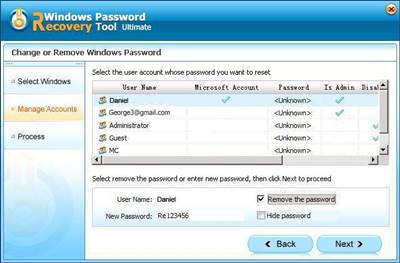
- Now select the user account whose password you want to remove. Select "Remove the password" and click "Next" to proceed.
- You have removed the password, Click ‘Reboot’ and logon to your system without any password.
- After successful login take control of your PC from the control panel by setting a new password.
This is the review of Tenorshare Windows Password Recovery Standard which is an excellent tool to remove your lost Windows computer password. It is best suited for home and office use, however it has some limitations like you can not create bottable USB, no support for Windows Domain users etc.
But if you want more functions than you can choose from ‘Professional’, ‘Enterprise’ and ‘Ultimate’ versions of the same software which provides different functions, the Ultimate version is the top most product with all functions.
Give It A Try Or Buy
Before you can buy it you can try it. After using it makes you feel that it works for you then you can buy it, the product comes with a 30-day money back guarantee. Go here to buy.
Advantages
- Easy to use password recovery tool for Microsoft Windows XP/Vista/7/8/10.
- 100% success rate.
- Works with USB flash drives.
- Support almost all file systems like FAT16, FAT32, NTFS, NTFS5, etc.
- Windows password recovery process is completely safe and non-destructive with no data loss.
If you have any doubts then reply via comments.



0 komentar:
Posting Komentar